
Whether you are sketching a life-like portrait, laying down underpaintings on a large canvas, or sketching architectural landmarks, every artist encounters the exact same obstacle: getting proportions and values right before committing permanent strokes. A single misplaced eye, a tilted jawline, or muddy shadow tones can disrupt an otherwise stunning artwork.
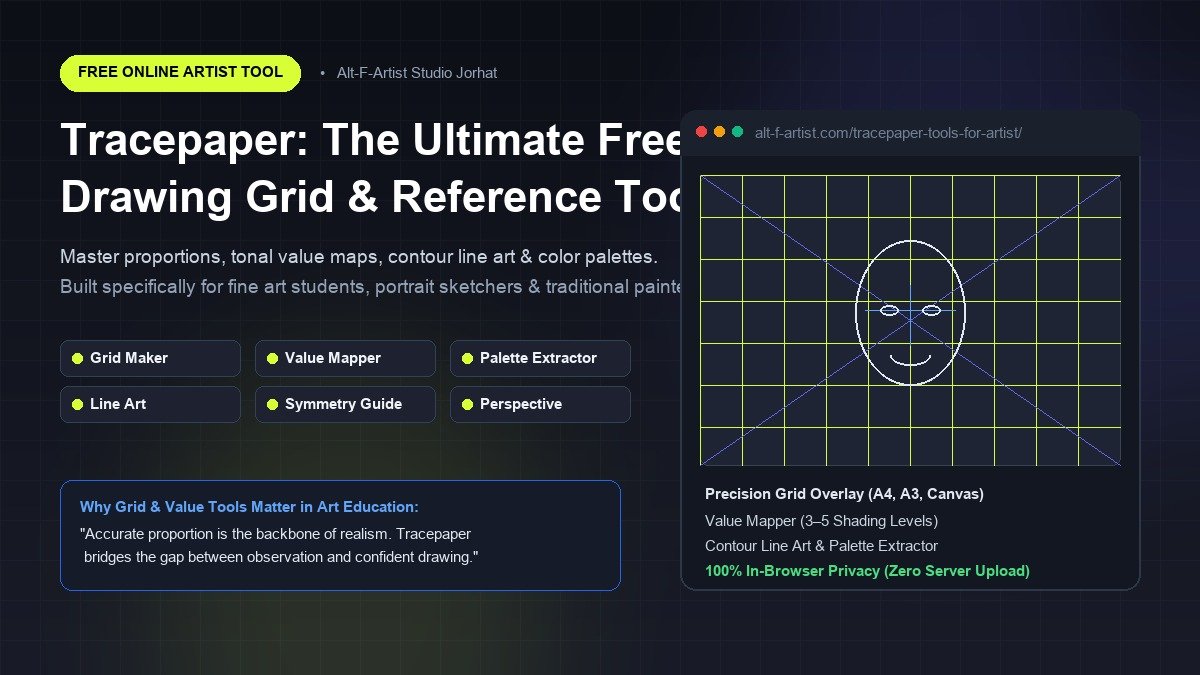
Historically, master artists from Albrecht Dürer to Chuck Close solved this challenge using proportional viewfinders and grid transfer systems. Today, we are proud to introduce Tracepaper by Alt-F-Artist Studio — an entirely free, browser-based digital toolkit crafted specifically for fine artists, portrait sketchers, painting students, and illustrators.
Try Tracepaper in Your Browser Right Now
No registration, no downloads, and 100% in-browser privacy. Upload reference photos and generate custom grids in seconds.
What is the Grid Method and Why Does it Work?
The grid method is a time-tested observational drawing technique where an artist overlays a uniform matrix of squares over a reference photo and draws a matching, scaled grid onto paper or canvas. Instead of attempting to capture the entire subject in one intimidating glance, the artist transfers individual landmarks cell by cell.
Why is this so effective? Human perception is heavily biased. When drawing a face freehand, our brains unconsciously enlarge features we assign emotional importance to—such as eyes and lips—while compressing foreheads and jaw angles. By segmenting the reference into discrete squares, Tracepaper's Grid Maker bypasses cognitive distortion, allowing you to see pure abstract angles, curves, and negative spaces as they truly exist.
"Drawing is not just what you think you see; it is training your eyes to measure relationships accurately. A grid is the most honest measuring tape an artist can have."
Comprehensive Tour of Tracepaper Features
Unlike bulky desktop software or ad-cluttered mobile apps, Tracepaper is purpose-built for artist ergonomics. Here is what is packed into this lightweight web suite:
1. Custom Precision Grid Maker
- Configurable Rows & Columns: Adjust from broad 3×3 guide blocks up to dense 30×30 grids depending on the complexity of your portrait or wildlife subject.
- Standard Canvas Formats: Seamlessly switch between Portrait and Landscape orientations, with support for standard paper ratios (A4, A3, square, and custom canvases).
- Diagonal Crosshairs: Toggle diagonal guidelines across each box to pinpoint subtle angles, such as pupil alignments, nostril flares, and ear axes.
- Smart Cell Numbering: Enable alphanumeric row/column coordinates (e.g., A1, B4) to ensure you never lose your spot while transferring to drawing paper.
- High-Resolution Export: Download your finished gridded photo in crisp PNG or JPG formats ready for printing or viewing on an iPad or tablet.
2. Tonal Value Mapper (Shading & Contrast Analyzer)
One of the most common reasons drawings look "flat" or "muddy" is poor value structure. Tracepaper's Value Mapper simplifies complex reference photos into 3 to 5 discrete tonal bands:
- Highlight Planes: Where the direct light source hits strongest.
- Midtones: The true local color and transition gradients.
- Core Shadows & Cast Shadows: Deep darks that ground your subject in physical space.
By studying the value-mapped version before shading, students at Alt-F-Artist Studio learn to establish bold contrast hierarchies before rendering delicate surface textures.
3. Instant Palette Extractor
Struggling to mix skin tones, foliage greens, or atmospheric sunsets? The Palette Extractor scans your reference image, analyzes the chromatic distribution, and generates a curated palette of dominant colors complete with exact HEX codes. Whether you are laying out oil paint on a palette or picking swatches in Procreate or Photoshop, this feature eliminates color-matching guesswork.
4. Contour Line Art Converter
Turn any photo into clean, high-contrast line work. This tool isolates silhouette boundaries and internal contour lines, making it an invaluable asset for light-box tracing, carbon paper transfers, or understanding pure linear rhythm.
5. Portrait Symmetry & Error Checker
When you stare at a drawing for hours, your brain adapts to errors and masks asymmetry. Tracepaper includes an instant horizontal mirror preview. Flipping your subject instantly highlights skewed perspectives, uneven eye heights, or asymmetrical nostrils so you can correct them early.
6. 100% In-Browser Privacy & Zero Lag
Privacy is paramount. Tracepaper processes all images entirely on your local device using client-side HTML5 Canvas technology. Your photos are never uploaded to any remote server or third-party database. You enjoy instant real-time performance without data usage or privacy risks.
Step-by-Step: How to Draw a Portrait Using Tracepaper
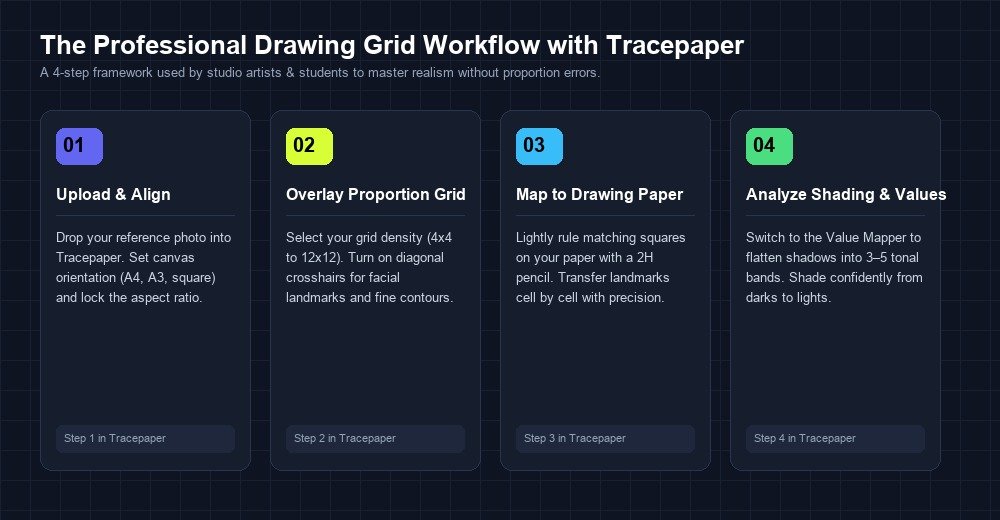
Ready to put Tracepaper to work on your next drawing board? Follow this battle-tested studio workflow:
-
Step 1: Open Tracepaper and Load Your Reference
Navigate to Tracepaper Artist Tools. Drag and drop your portrait photo into the canvas dropzone. Use the zoom and drag controls to position the face cleanly within the frame. -
Step 2: Set Your Grid Density
For standard portrait drawings on A4 cartridge paper, a grid of 6 to 8 columns is ideal. If drawing fine details like eye reflections or jewelry, step up to 10 or 12 divisions. Enable diagonal crosshairs to assist with angled contours. -
Step 3: Prepare Your Drawing Paper
Using an H or 2H graphite pencil and a clear ruler, lightly draw an identical number of grid squares on your drawing sheet. Keep your pencil marks faint so they erase effortlessly later. -
Step 4: Transfer the Outline Cell by Cell
Focus on one square at a time. Note where lines enter and exit the boundaries of each cell. Watch how quickly the overall portrait locks into accurate proportion without the frustration of repeated erasing. -
Step 5: Switch to Value Mapper for Shading
Once your contour outlines are locked, switch Tracepaper's tab to the Value Mapper. Identify where the darkest shadows sit and shade those blocks first with 2B or 4B pencils. Gradually transition toward the lighter midtones for realistic depth.
Bridging Digital Precision with Traditional Art Mastery
A common question among art beginners is: "Will using a grid prevent me from developing freehand drawing skills?"
The reality is the exact opposite. When used as a learning companion, the grid method trains your brain's internal ruler. Over time, your eye begins naturally dividing complex forms into negative space, measuring sightlines, and assessing proportion instinctively.
At Alt-F-Artist Studio in Jorhat, we integrate foundational measuring techniques alongside creative freehand exploration. Students enrolled in our professional programs—such as the Diploma in Fine Arts (1 Year Course) and the Advanced Diploma in Fine Arts (2 Years Course)—learn everything from classical anatomy and still life to oil painting, gouache rendering, and digital illustration.
Interested in exploring how our students master these techniques? Browse through our Student Art Portfolio & Gallery to see finished portraiture, charcoal sketches, and watercolor studies. If you are nearby in Upper Assam, you can also join offline classes at our Kenduguri, Jorhat branch.
To deepen your creative process further, explore our companion guides on what is an artist sketchbook and how to start one, as well as our curated collection of sketchbook ideas and creative exercises.
Frequently Asked Questions (FAQs)
Is Tracepaper completely free to use?
Yes, Tracepaper is 100% free with no subscriptions, premium paywalls, or hidden charges. It was created by Alt-F-Artist Studio to support the global artist community.
Does Tracepaper store or upload my photos?
No. All image operations run directly inside your web browser using HTML5 Canvas. Your files are never sent over the internet or saved to any server.
Can I use Tracepaper on mobile phones or tablets?
Yes! Tracepaper is fully responsive and works smoothly across desktops, iPads, Android tablets, and smartphones.
How can I learn fine arts with certified instruction?
Explore our government-registered Fine Arts and Graphic Design Courses at Alt-F-Artist Studio in Jorhat, or contact our admissions team for class timings and fees.
Start Creating with Confidence
Whether you are preparing a competition entry, a commissioned portrait, or a personal sketchbook study, accuracy gives you the freedom to express yourself without self-doubt.